
Track your healthOwn your data
A free, private symptom tracker & health journal.
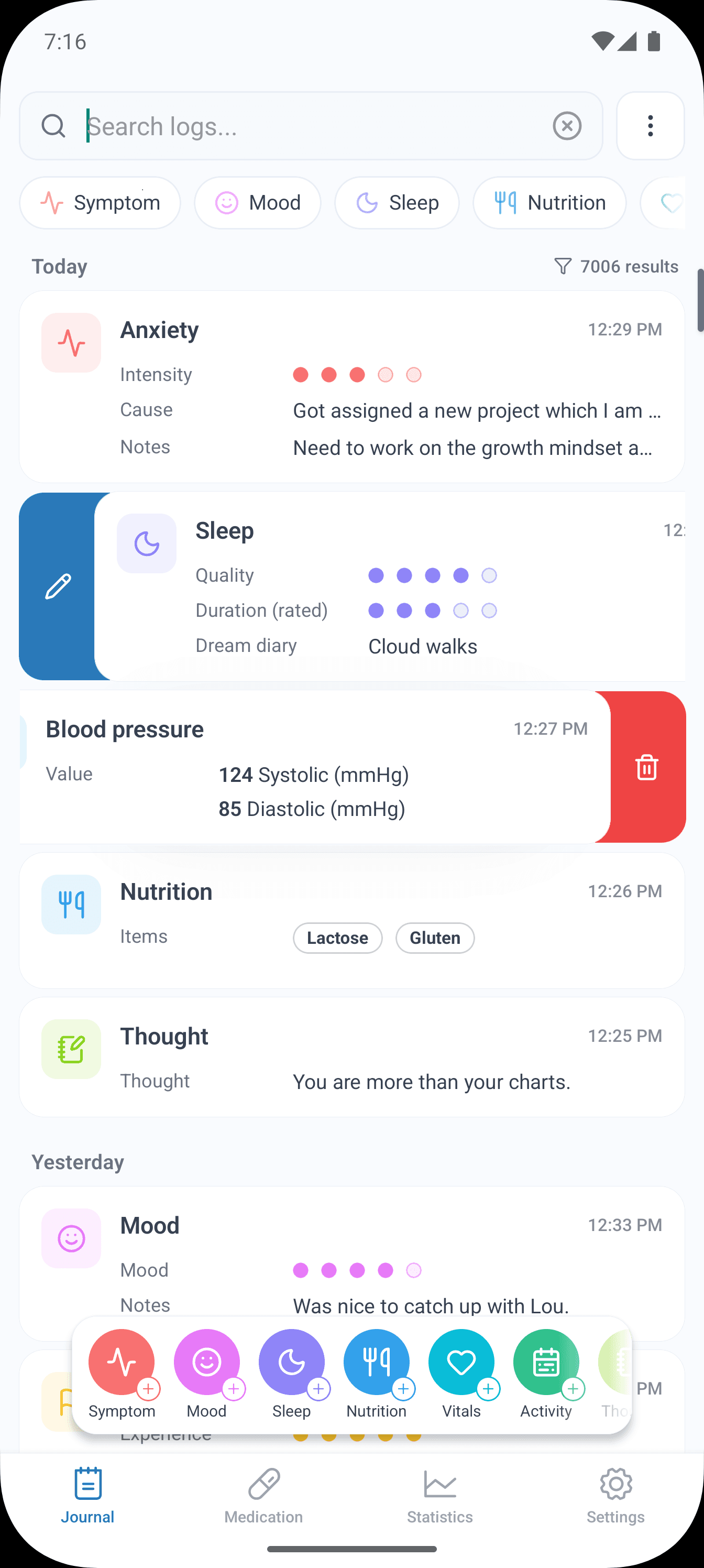
Everything stays offline on your device. Log symptoms, vitals, sleep, cycle, medications and more, spot patterns in clear statistics, and bring a useful timeline to your next doctor's appointment — no account, no cloud, no ads.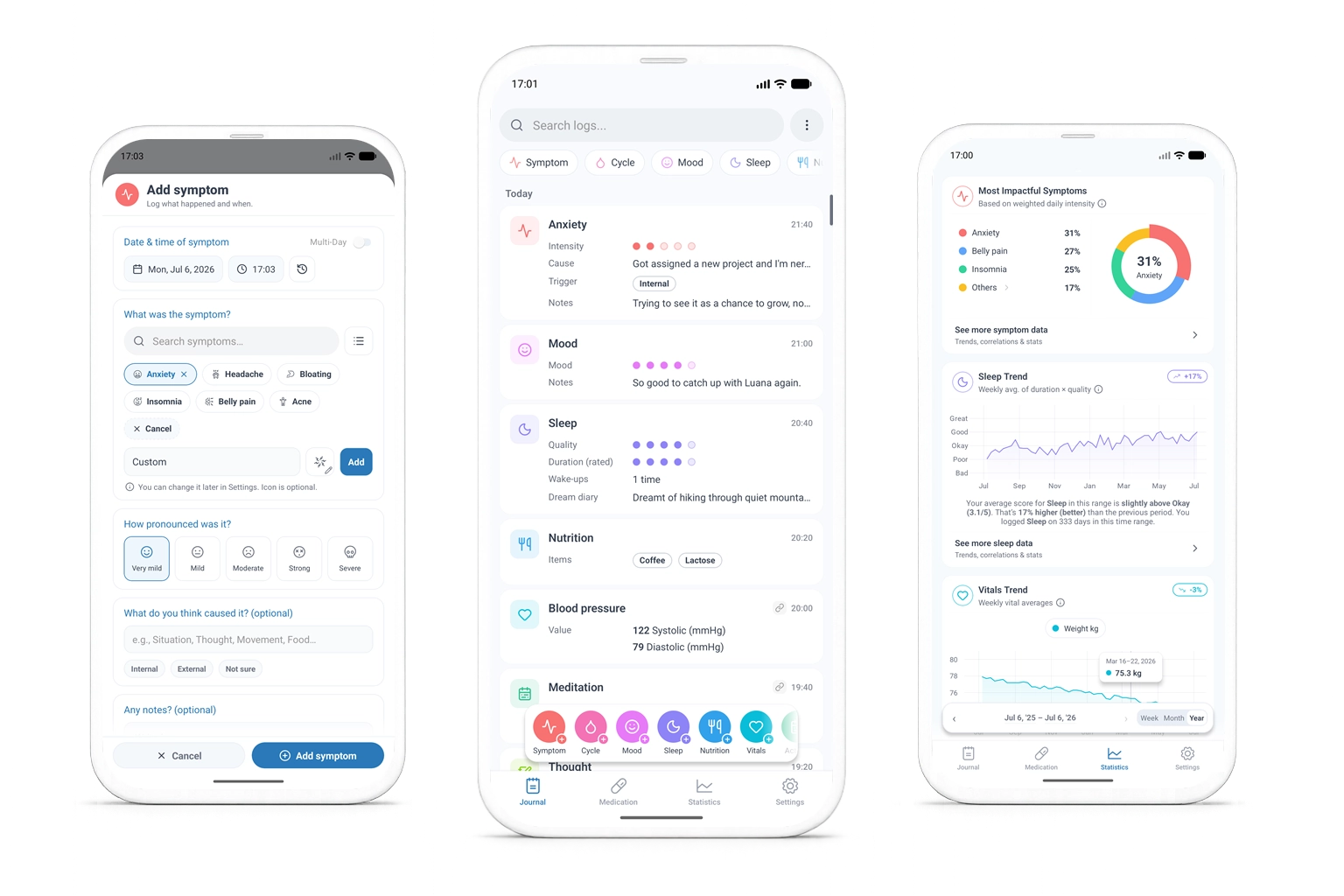


About SympLog
By BitByBit.ch – built on years of experience designing highly sensitive IT systems for Swiss public authorities and the healthcare sector. SympLog grew out of a passion for tools that respect your privacy and help you stay on top of your health.
Fast & customizable
Designed for quick and simple logging. Easily adapt the app to your personal needs and create your own categories.
Focus on privacy
The app stores all your data exclusively locally on your device (export possible). No cloud, no user tracking. Your health data belongs to you alone.
Encrypted & secure
Your data is stored securely and encrypted. You can choose your unlock method yourself: biometrics, PIN, or your standard device lock.
Discover correlations
Identify patterns and correlations between your entries. Find out how your lifestyle affects your health and prepare for your next doctor's visit.
Features
Everything you need to understand your health patterns
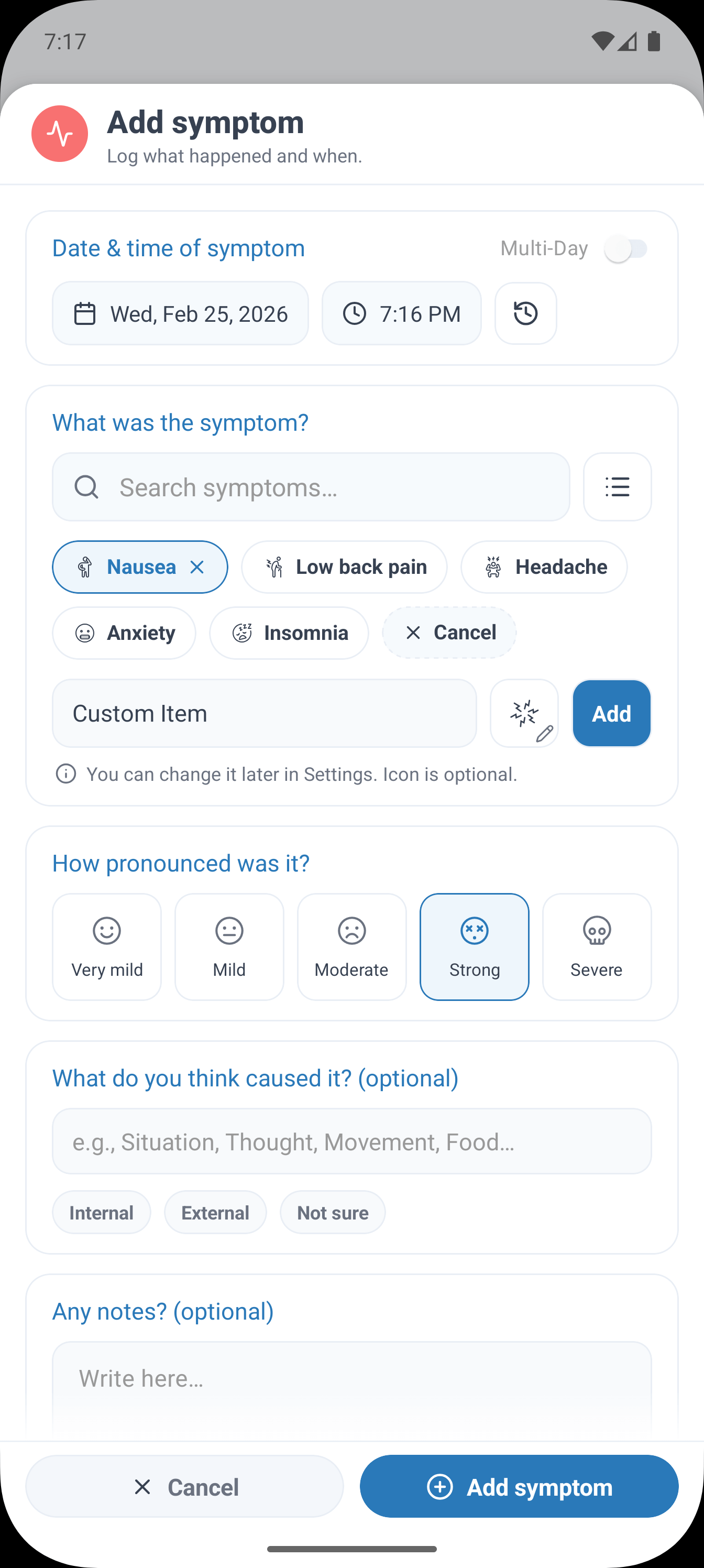
Symptom Tracking
Log symptoms with severity, notes, triggers, and context so patterns are easier to spot.
Sleep Logging
Track sleep duration and quality to understand your rest patterns, and use the sleep diary to write down dreams and other notes.
Cycle Tracking
Track your cycle alongside symptoms, mood, sleep, and other health patterns, with predictions for upcoming cycle days.
Vitals Tracking
Track weight, blood pressure, heart rate, temperature, blood glucose, steps and more.
Mood Journal
Record your daily emotional state and track mood patterns over time.
Nutrition Log
Log meals and nutrition with customizable food items and categories.
Activity Tracking
Record physical activities, exercise, and their impact on your well-being.
Thoughts & Notes
Capture thoughts, reflections, and important notes alongside your health data.
Life Events
Log significant events like job changes, losses, or milestones that affect health.
Medications
Define your medications and toggle them on/off on a calendar view.
Choose from built-in categories or create your own for symptoms, activities, events, nutrition, and vitals.
Symptom Tracking
Log symptoms with severity, notes, triggers, and context so patterns are easier to spot.
Sleep Logging
Track sleep duration and quality to understand your rest patterns, and use the sleep diary to write down dreams and other notes.
Cycle Tracking
Track your cycle alongside symptoms, mood, sleep, and other health patterns, with predictions for upcoming cycle days.
Vitals Tracking
Track weight, blood pressure, heart rate, temperature, blood glucose, steps and more.
Mood Journal
Record your daily emotional state and track mood patterns over time.
Nutrition Log
Log meals and nutrition with customizable food items and categories.
Activity Tracking
Record physical activities, exercise, and their impact on your well-being.
Thoughts & Notes
Capture thoughts, reflections, and important notes alongside your health data.
Life Events
Log significant events like job changes, losses, or milestones that affect health.
Medications
Define your medications and toggle them on/off on a calendar view.
Why We Created SympLog
This app was born from personal experience and a simple frustration: understanding your own health shouldn’t be this hard.
It started within our own team. Someone close to us has lived with chronic eczema for over a decade. Most treatments focused on calming flare-ups, not uncovering what was causing them. When it finally came time to sit down with a doctor, the day-to-day details had faded or blurred together, making it harder to have meaningful conversations or reach a clear diagnosis.
We also watched elderly relatives struggle to track symptoms and their severity. Notes were scattered, memory was unreliable, and existing apps felt too complex or inaccessible.
We spoke with people dealing with sleep disorders, migraines, digestive issues, hormonal changes, anxiety, depersonalisation, and chronic pain. Many suspected their symptoms were linked to sleep, stress, or daily routines — maybe lactose or gluten was behind the stomach cramps, maybe caffeine was ruining their sleep, maybe meditation would ease the anxiety. But without consistent tracking, those patterns stay hidden.
Over time, one thing became clear: memory alone isn’t enough to reliably track ongoing symptoms. Tracking is difficult — and in times when personal data increasingly feeds targeted advertising and AI training, we felt that health data should simply stay with you.
That’s why we built an easy-to-use, private way to track symptoms and routines, so you can better understand your health.
Because taking control of your health shouldn’t come at the cost of privacy.
Frequently Asked Questions
Find answers to common questions about SympLog
SympLog does not make money from the app. We believe simple, private health tracking should be accessible, regardless of financial circumstances — and from our own experience, we know how much that can matter. We do not want to bother you with constant rating prompts, but if SympLog has helped you, an honest review can help others discover it and hopefully benefit too. If something feels confusing or you have an idea, please consider reaching out; because SympLog is privacy-focused, we cannot see how people use it, where they get stuck, or every issue that happens. Feedback and requests help shape the app. Thank you for trying SympLog and supporting it.
Your health data is encrypted and stored locally on your device only—no accounts and no cloud storage. While no system can guarantee absolute security, keeping data on-device and encrypted greatly reduces the risk of unauthorized access.
No account is needed. Simply download the app and start tracking immediately. We believe in simplicity and privacy — no sign-ups, no emails, no passwords.
You can track symptoms, vitals, mood, sleep, cycle, nutrition, activities, thoughts, and life events. You can also manage medications with a calendar toggle. All items are customizable — edit defaults or create your own.
Your entire database is always encrypted. You can choose your unlock method: Biometric (fingerprint/face), PIN code, or convenience mode which uses your device lock. Even in convenience mode, your data remains fully encrypted.
Yes, you can export and import your data. There are three options for this: a password-encrypted backup that you can restore later (or use to transfer to a new device), a password-protected ZIP export containing CSV files for your own analysis, and a PDF report of your journal entries (secured as a password-protected ZIP file) to prepare for your next doctor's appointment. CSV files can also be imported back into SympLog (currently on iOS, coming to Android with an upcoming update) — re-import your own exports or add journal data from spreadsheets and other apps. The app provides a template for each category and shows a preview before anything is saved. Always keep exported files safe and do not share them with others.
Yes. SympLog can optionally import health data from Apple Health (iOS) or Health Connect (Android). It is off by default and you choose exactly which types to sync. Supported data includes: • Steps, distance, and active calories • Calories eaten • Blood pressure, average heart rate, resting heart rate, body temperature, and blood glucose • Weight and body fat • Sleep, workouts, and meditation This data usually comes from apps you already use (like Garmin, Fitbit, Oura, and many others). According to Apple and Google, both platforms store your health data locally on your device rather than in the cloud. Apple states that data is encrypted on-device (Apple Privacy), and Google states Health Connect acts as an on-device database (Google Support). Access is read-only. SympLog only reads what you allow and never writes, changes, or shares it. The data is simply copied into SympLog's encrypted local database. No data ever leaves your device.
SympLog is available in English, Deutsch, Français, Español, and Português (BR). It uses AI-powered translations, and you can select your preferred language at any time within the app.
Yes, SympLog supports dark mode. It follows your system preference or can be set manually in the app settings.
None. SympLog has no internet access and no accounts, so there is nothing to send and nothing to collect. If an error occurs, the app saves a small technical log (device model, OS version, app version, locale, timezone, and the error details) only on your device. You can choose to email this log to us from Settings to help fix a bug — and it is only ever sent if you review the message and press send yourself.
No. SympLog is designed to work entirely offline. It has no accounts, no servers, and no analytics or crash-reporting code, so there is nothing that sends your data anywhere. The two platforms handle this differently: on Android the app is built without the internet permission, so the system itself blocks it from making any network connection — you can verify this in the app's permission list. On iOS there is no equivalent permission to remove, so there the guarantee comes from the app containing no networking code. The only exception is if you choose to email us a bug report, which is handled by your own email app rather than by SympLog.
Privacy Policy
Last updated: June 2026
Local Data Storage
All your health data is encrypted and stored locally on your device. SympLog uses no accounts and no cloud, so your information stays private and fully under your control.
No Data Collection & No Internet Access
SympLog collects nothing about you — no accounts, identifiers, location, or IP address — and contains no analytics or tracking. The same code runs on both platforms, with no networking built in. On Android the app also ships without the internet permission, so the system itself blocks any connection. iOS has no such permission, but with no networking code the result is the same: your data stays on your device.
Health App Connections (Optional)
You can optionally import data from Apple Health (iOS) or Health Connect (Android) to view it alongside your own entries. This is off by default, and you choose exactly which data types to import. Access is strictly read-only — SympLog never writes to or changes any data in Apple Health or Health Connect. Imported data is encrypted and stored locally like everything else, and is never transmitted or shared. You can disconnect and revoke access at any time in Settings.
On-Device Error Log
If an error occurs, the app saves a short technical log to your device. You can choose to email it to us from Settings → Contact. The log contains technical details only:
Phone Brand & Model
Helps us reproduce problems that affect specific devices (e.g. 'Samsung Galaxy S23').
Operating System & Version
Identifies bugs tied to a particular OS release (e.g. 'Android 14' or 'iOS 17.2').
App Version
Tells us whether the issue was already fixed in a newer release.
Locale
Your language and region (e.g. 'en-US'), to catch translation and formatting issues.
Timezone
Your device timezone (e.g. 'Europe/Zurich'), to debug time-related calculations.
Error & Stack Trace
The technical error and where it occurred in the code — essential for pinpointing and fixing it.
No Data Sharing
We never sell, trade, or share your data. With no servers and no network connections of its own, the app has nowhere to send it.
Your Control
Because everything is stored locally, you remain in full control. You can export or delete your data at any time in the app settings, and uninstalling SympLog removes all of it from your device.
Contact Us
Have questions about your privacy? Contact us at privacy@symplog.com
Ready to Start Tracking?
Download SympLog and start understanding your health patterns today.
Easy to Use
Simple Interface
100%
Private & Local
No Account
Required
Unlimited
Tracking